
Unit Upgrades: Fusion Shard Costs, Stars and the Upgrade Panel
A frame-checked walkthrough of upgrading units in Be The Final Boss: where the Upgrade button lives, which Fusion Shard a unit asks for, what the star bar counts, and how the FUSION panel converts shards up the rarity ladder — which prices each rung separately rather than applying one ratio.
A unit upgrade spends Fusion Shards on one unit — the skill tree spends coins on your whole castle
This page follows two full Be The Final Boss runs through the upgrade side of the shard economy. Every number below is read off a frame we extracted and looked at: a Shiny Bone Guard Lv.1 asking for 6 Rare Fusion Shards, the same unit at Lv.2 with a 1/10 star counter six seconds later, and the FUSION panel pricing each rarity rung separately — 5 Uncommon into 1 Rare, 5 Rare into 1 Epic, 5 Epic into 1 Legendary, and rows that ask for 4 at Legendary and Mythic. What the footage never shows stays unknown: no per-rarity shard table, no rule that decides a unit's star bill, and no drop rates. Where to earn shards is a separate page; this one is about what they buy.
Source footage
Primary: “I Became The STRONGEST Final Boss in Roblox…” by Quacks (35:37, YouTube, uploaded 2026-07-20) — the UNITS roster and both UPGRADE windows are that run's own UI. Donor: “UPD6 Be The Final Boss Unit Tier List” by HeyranLy (25:08, YouTube, uploaded 2026-08-28) supplies the Update-6 FUSION screen. Every published frame was opened and read at full resolution on 2026-09-28. Two things we are not smoothing over. First, the conversion ratio is not one rule: the July panel heads itself Fuse 5x Uncommon Fusion Shard and prices the Uncommon, Rare and Epic rows at 5 while its Legendary row asks 4, and the Update-6 panel heads itself Fuse 5x Epic Fusion Shard into 1 shard with Legendary and Mythic both at 4. Second, the primary footage stops at 2026-07-20, so anything added to the game after that date is not claimed on this page. Every count here is what those runs' own UI displayed on those dates, not a datamined value.
Quacks — I Became The STRONGEST Final Boss in Roblox...The upgrade loop, screen by screen
- 1
Upgrades live on the unit card, not in the skill tree
The Upgrade button sits on each unit's own card inside the UNITS panel — the same panel that carries the INDEX button down its left edge. Every card shows a Lv. line, a population Cost and a star counter, and the counters differ across the roster in this frame: Skull King Lv.1 at 0/2, Barbarian Lv.1 at 0/3, Hellfire Warlock Lv.1 at 0/6. That second number is what this unit's next star asks for. It is worth naming what this is not: the skill tree spends coins on your whole castle and is covered on its own page; a unit upgrade spends Fusion Shards on one unit.
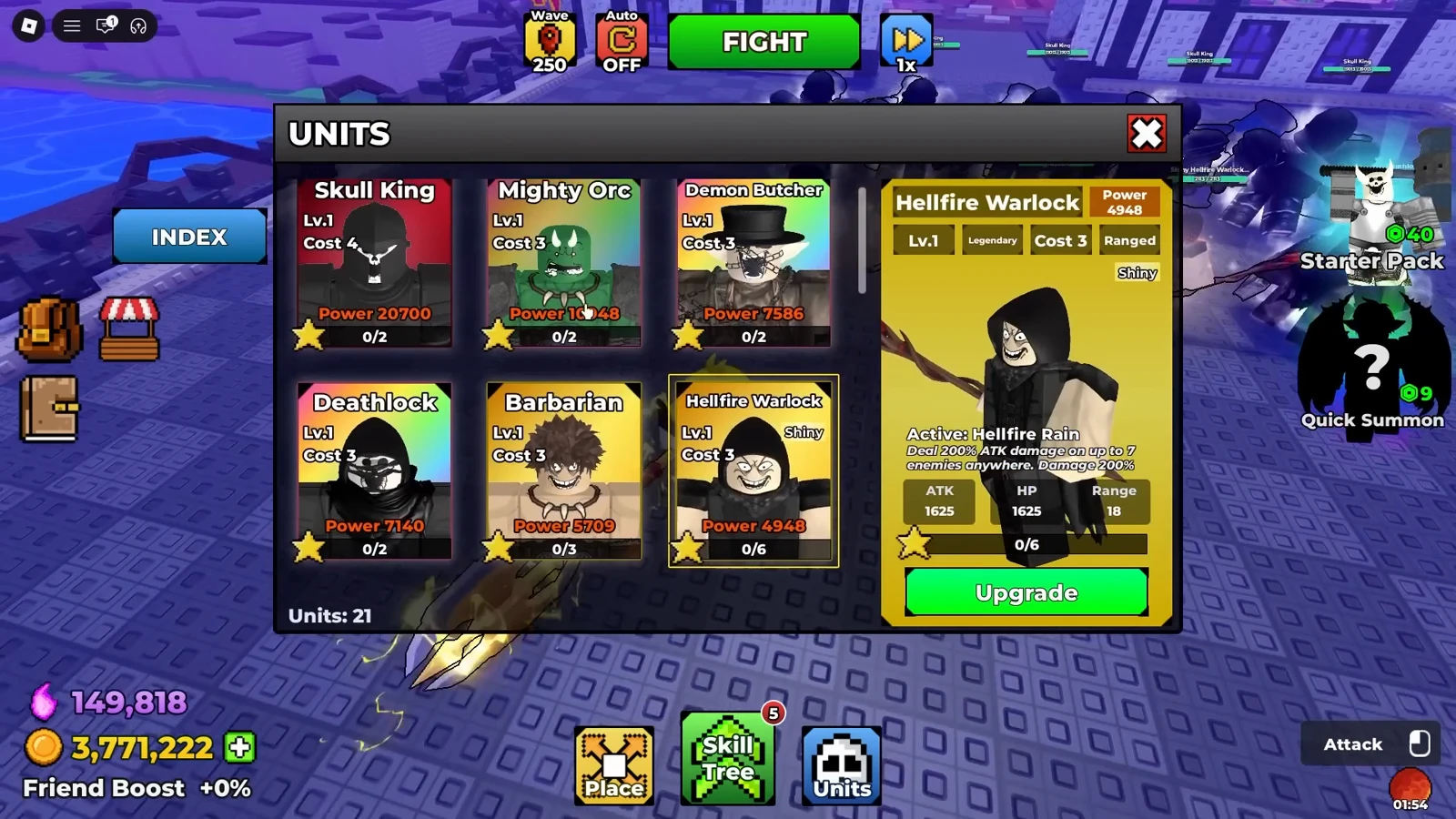
Every card carries its own star counter — the number after the slash is the shard bill for this unit, not a fixed rarity table. Watch at 34:12 - 2
Open the UPGRADE window and read the bill
The window is two cards and a bar. Left: the unit, with its name, Lv., population Cost, any Shiny tag and its Power. Right: the Fusion Shard that unit consumes, showing how many you have stepped in against how many you hold. In the July footage a Shiny Bone Guard Lv.1 wants Rare Fusion Shards, its shard card reads 0/0 and the star bar reads 0/6 — so the green button is not a Use button at all, it reads Need Shards. The shard type is named by the panel; you do not choose it.
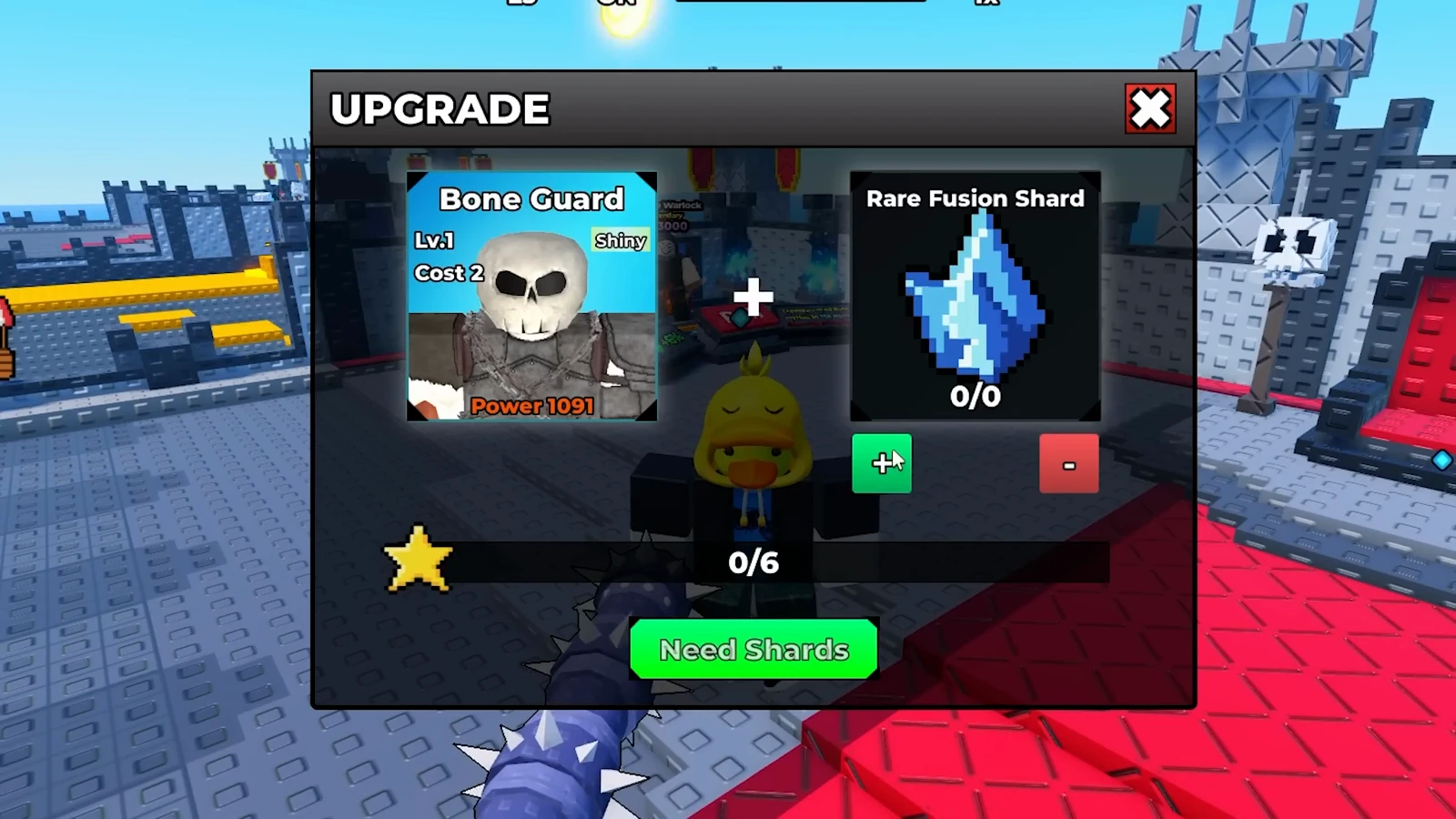
The blocked state is the informative one: it names the exact shard type and the exact count you are short of. Watch at 8:24 - 3
Step the bar up to the denominator, then press Use
Same unit, later in the run: the shard card now reads 6/8, the star bar is full at 6/6, and the button has become Use 6. The green plus and red minus beside the shard card step how many shards go in, and the button takes its number from them — a Shiny Hellfire Warlock Lv.1 later in the same video shows 5 inserted out of 10 held against a 5/6 bar with a Use 5 button, so you can commit fewer shards than the star asks for and leave the bar short.
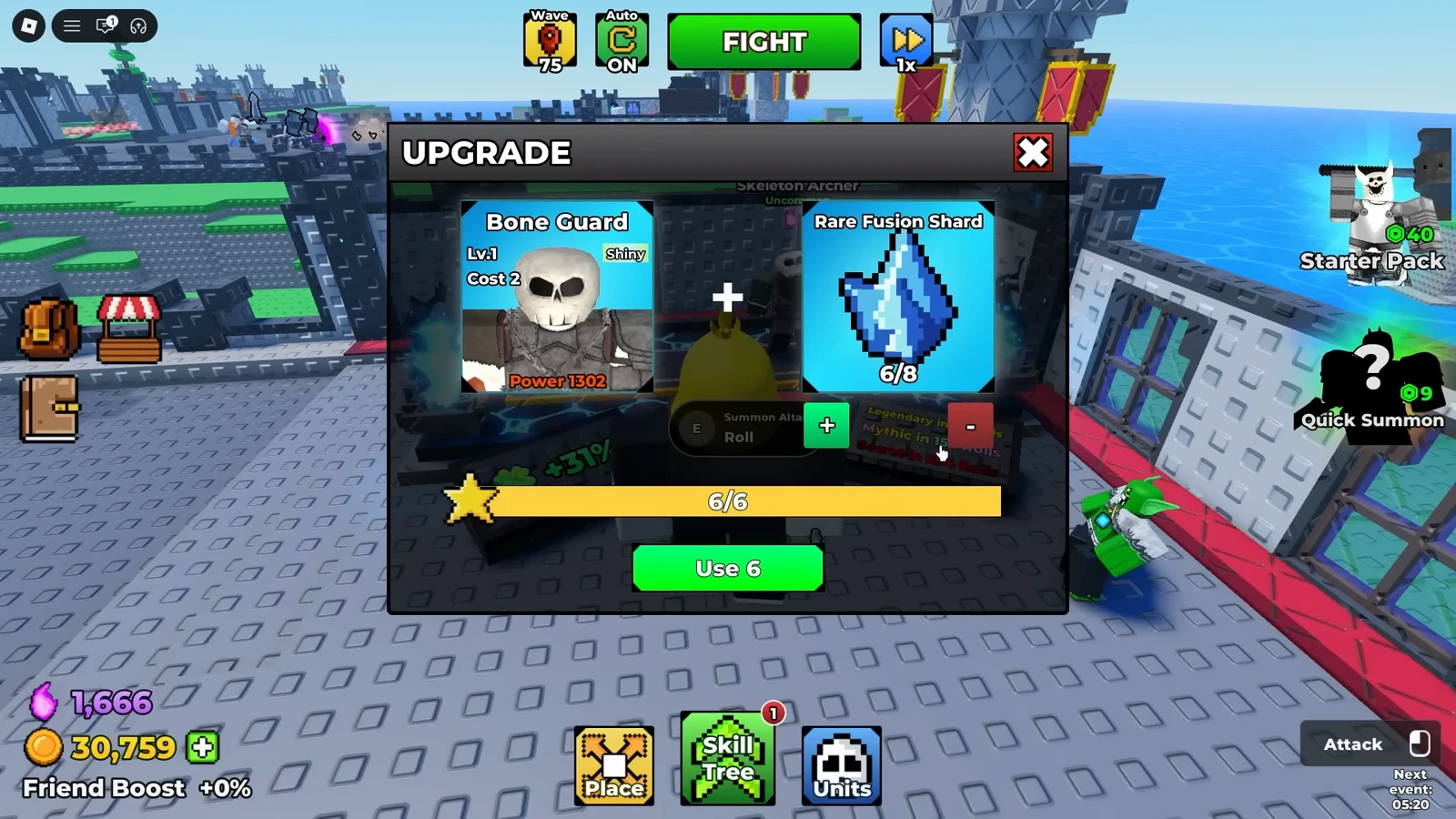
Plus and minus step how many shards go in, and the button takes its number from that count — a full bar is not what turns it green. Watch at 16:02 - 4
The card moves up a level and the next star costs more
Six seconds after Use 6, that Bone Guard's card in the UNITS roster reads Lv.2 with a star counter of 1/10 — the level went up, and the star that bought it had asked for 6. Nothing on screen states the rule that sets these numbers, and the same roster holds a second Bone Guard still at Lv.1 with 0/3, so do not assume one threshold per rarity or per level; read the counter on the card you are about to spend on.
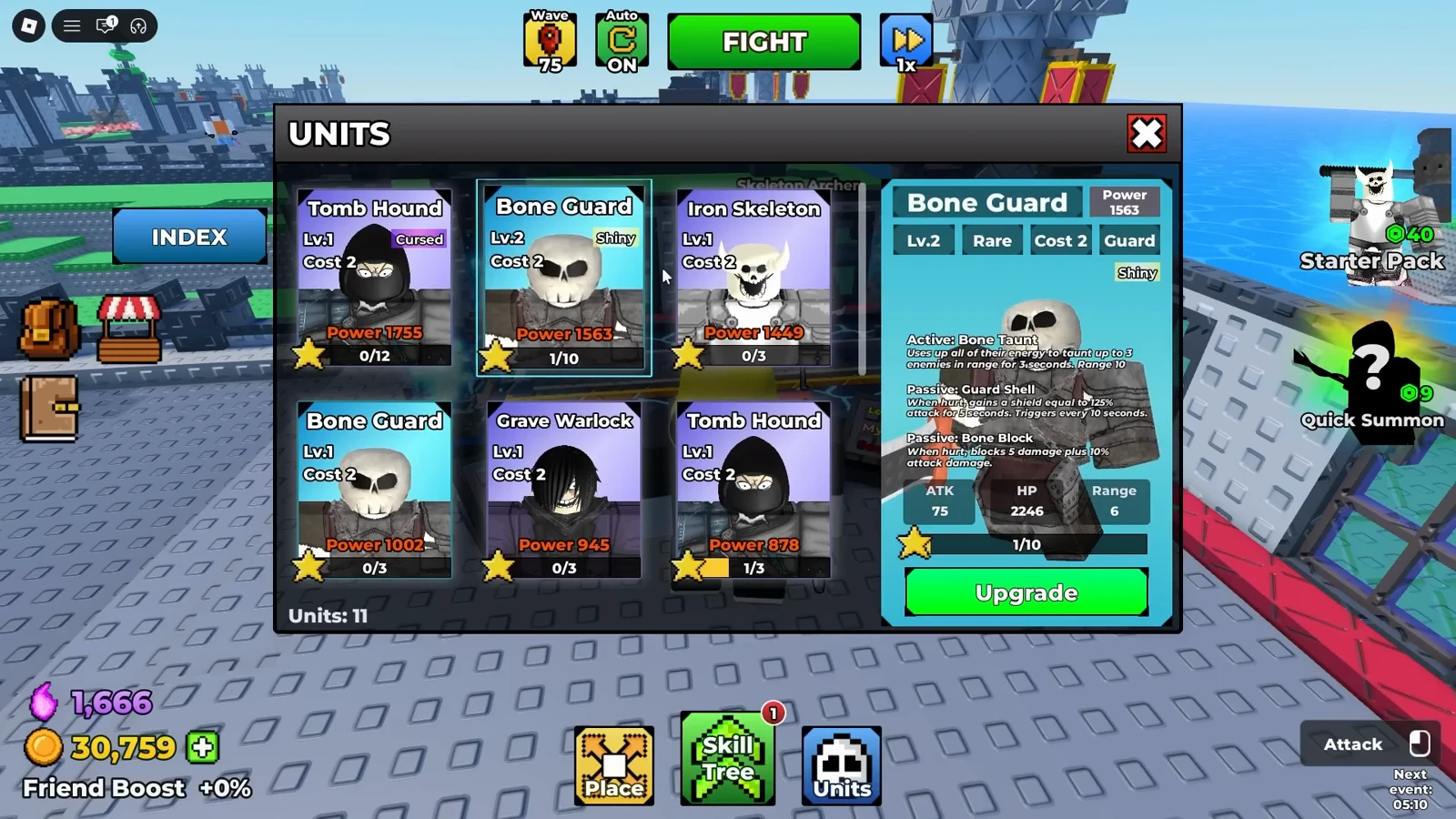
Level up and the next star asks for more — 10 here, where the star that just bought Lv.2 cost 6. Watch at 16:08 - 5
Fund it with the FUSION panel, which prices each rung
The FUSION panel is where the ladder lives, and it prices each rung on its own row. In the July footage My Shards reads Uncommon 8/5, Rare 0/5, Epic 1/5 and Legendary 0/4, and selecting a row heads the panel Fuse 5x Uncommon Fusion Shard with Possible Results showing 5 becoming 1 of the next tier at 100%. The Update-6 screen in the frame below keeps the shape and adds a row: Rare 1/5, Epic 1/5, Legendary 0/4 and Mythic 0/4, headed Fuse 5x Epic Fusion Shard into 1 shard, with a quantity slider and a + button where the plain FUSE button used to be. So the ratio is per rung, not one rule — five at Uncommon, Rare and Epic, four at Legendary and Mythic. The red line under the button reads Consumed fragments cannot be recovered. Where those shards drop is a different page.
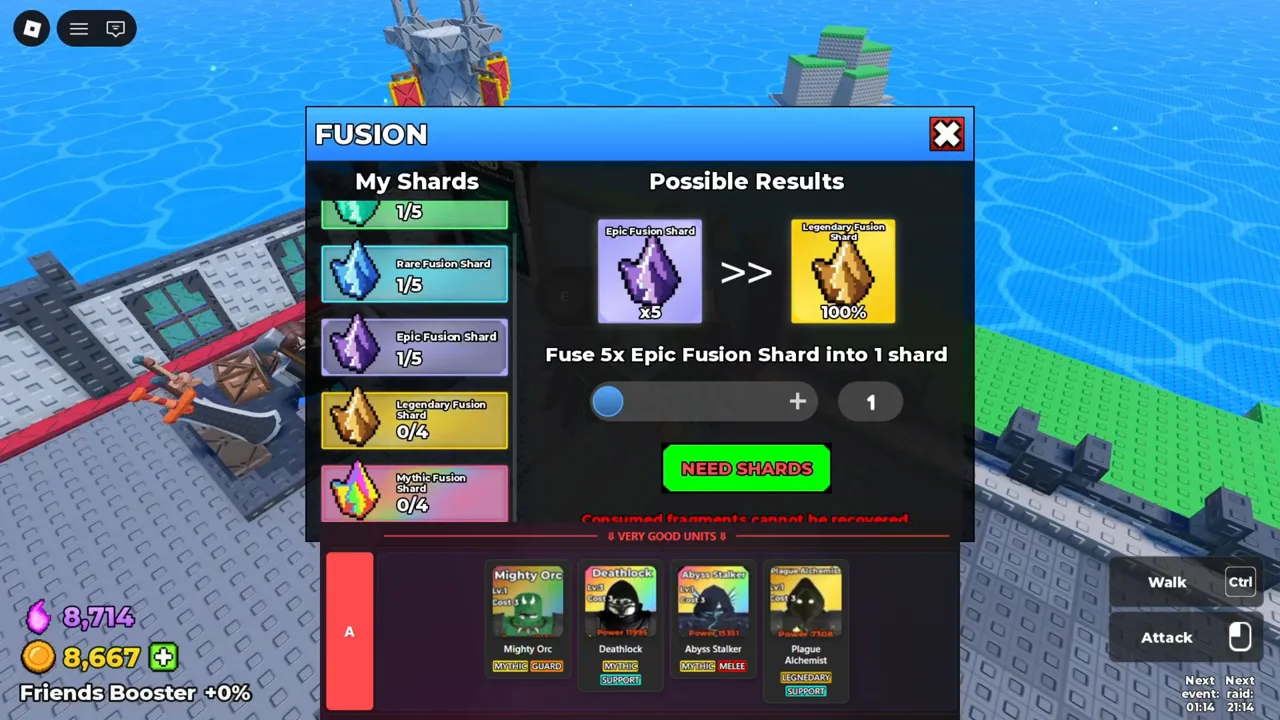
Same ladder, newer build: it now scrolls to a Mythic row and swaps FUSE for a quantity slider, but the per-rung prices still read 5, 5, 5, 4, 4. Watch at 18:30