
Population & Unit Slots: What the UNITS PLACED Counter Means
How the placed/limit counter behaves, what each unit spends from it, and the two routes the footage shows for raising the cap — every number read off a frame.
Population is a slot budget, and the counter is the receipt
The readout above the Place, Skill Tree and Units buttons is the whole system in two numbers: what your placed units currently spend, and the cap they spend it from. In the recording reviewed on 2026-09-29 it reads UNITS PLACED: 2/10, then 8/10, then 10/10 in red once the cap is reached. Units do not all spend the same: a Skeleton Archer tooltip in that recording ends in Slots 1, and so does a Bone Grunt. Two ways up appear on screen: Population nodes in the skill tree, where the Population III tooltip says the slot capacity increased to 10, and the shop's Extra Population row, described as +10 unit population. Caps differ between accounts - another recording reviewed the same day shows the same counter at /50 - and the footage never explains how either number is calculated, so the exact cap formula stays unknown.
Source footage and review date
All five frames were read natively on 2026-09-29. Four come from the page's primary, “I Became the ULTIMATE Final Boss in Roblox!” by MegZ (12:24, uploaded 2026-07-28, 1,424 views at review): a clean UI capture with no facecam, watermark or burned-in caption at those seconds. The fifth, the shop row, comes from the donor recording “Be The Final Boss. buying gamepasses and tips” by OrionElmo (19:05, uploaded 2026-07-24, 50 views). The mechanic is also described in speech in “Be The Final Boss Guide! (CODES, BEST LAYOUT, Best Upgrades, Coins Fast, Tips & Tricks, More) Roblox” by NoobBlox (9:24, uploaded 2026-07-16, 5,450 views) - “there is a maximum number of units you can place… some units take up more space” - credited here as the spoken-account source; none of its frames ship, because every one carries burned-in word captions. Candidates reviewed and rejected as frame sources on this pass: ttoormgamer (permanent webcam facecam), KingGoose (no placement counter in any sampled frame), Berlian kecil (Bandicam watermark on every frame), blankcup (burned-in paragraph captions), AccelToWin (burned-in captions plus channel watermark). What this footage cannot prove: how the tooltip's 10 combines with the counter's cap, how many Population levels exist beyond the ladder visible here, or whether any mode changes the cap.
MegZ — I Became the ULTIMATE Final Boss in Roblox!The placement counter, screen by screen
- 1
Read the counter above the buttons
With placement mode open, the counter sits above Place, Skill Tree and Units and reads UNITS PLACED: 2/10. The number before the slash is what the units already on the field are spending; the number after it is the cap those points come out of, so this frame has eight points of room. The panel on the right is the placement list - one card per unit, with its own power figure and a Formations row above - and the counter is the shared budget they draw on. Note what is not the constraint: 4,467 Coins and 53 Souls are on screen, and the placement readout is the thing limiting the board.
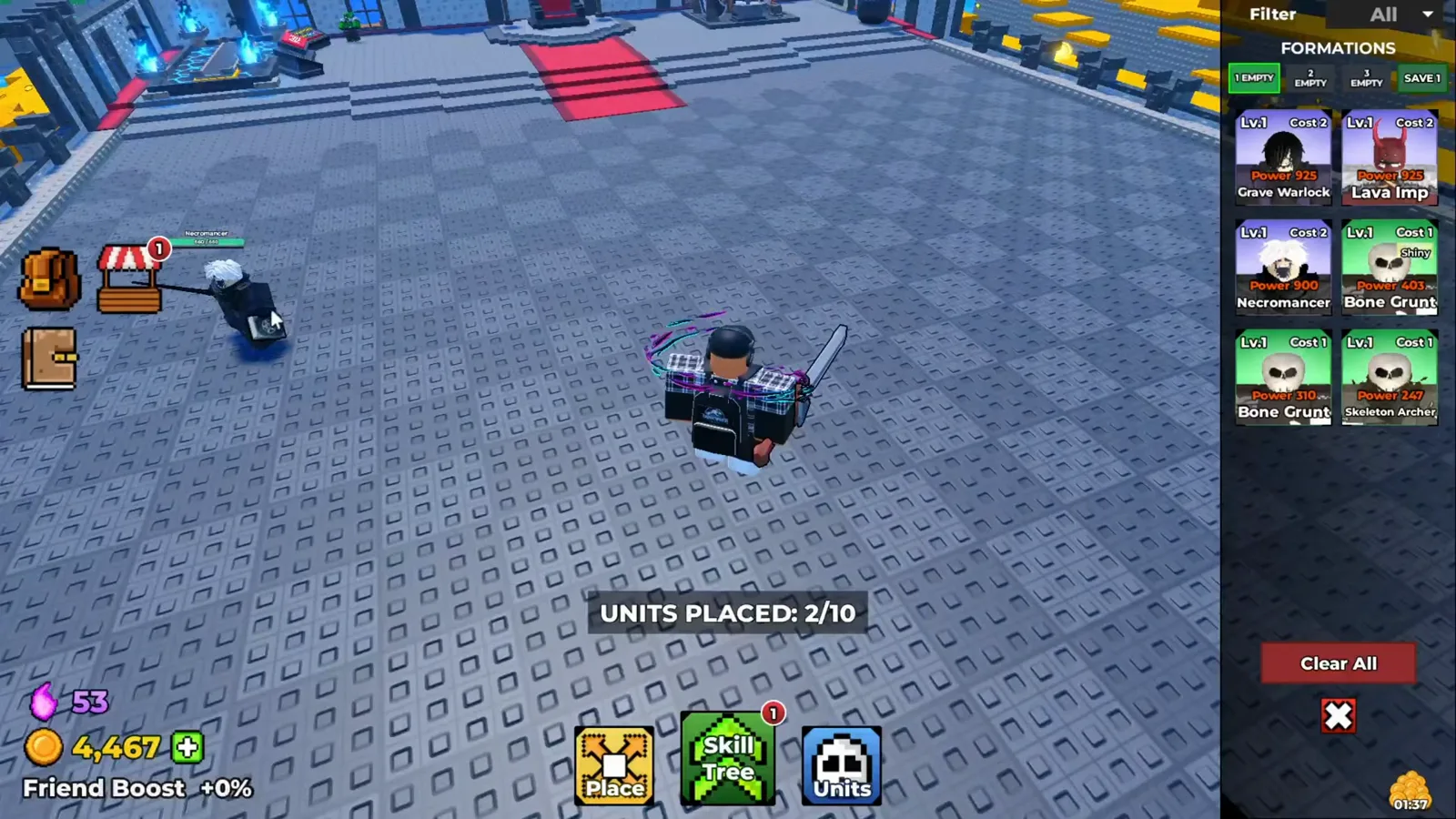
Two numbers on one line: what the units on the field spend, and the cap they spend it from. Watch at 3:48 - 2
Units declare how many slots they take
Units do not all cost the same amount of room. Hovering a Skeleton Archer in this frame opens a tooltip that ends with Slots 1, and the counter in the same view reads UNITS PLACED: 8/10. A Bone Grunt tooltip a few seconds later ends with Slots 1 as well. The figure is printed on the unit, not on the counter, which is why the same headcount can fill very different amounts of the cap: the recordings reviewed for this page show units declaring Slots 1 and Slots 2.
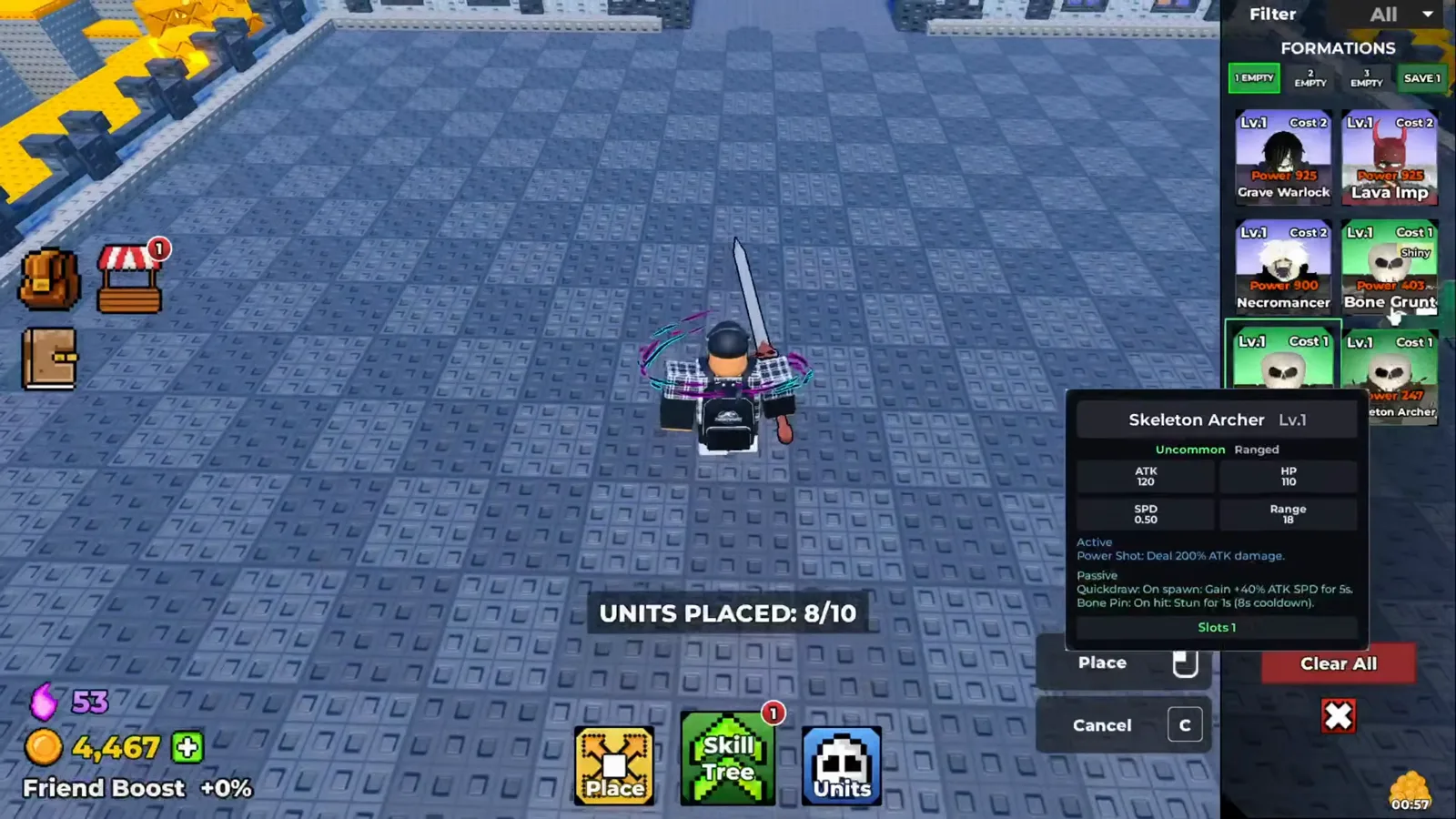
The slot figure is printed on the unit card, not on the counter — this one takes a single slot. Watch at 3:56 - 3
At the cap the readout turns red
When placement is full the game does not hide the number, it recolours it: 10/10 renders in red, where 2/10 and 8/10 earlier in the same recording render in white. The board and the unit cards stay on screen - the counter is the only thing that changed. The footage never shows a placement being refused at the limit, so we do not claim what happens when a unit meets one remaining point.
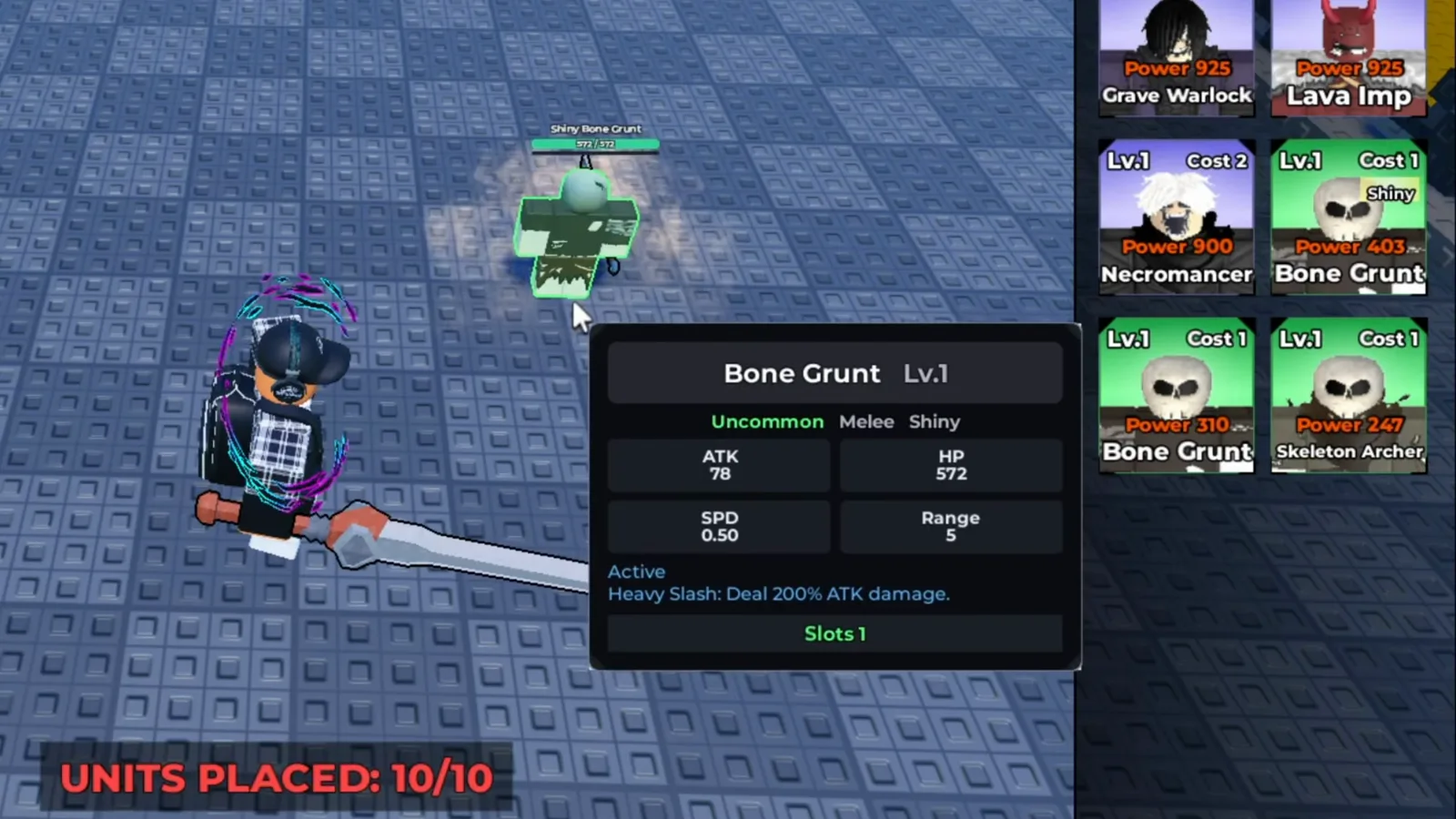
The readout switches to red once the placement is full; the placement board and the unit cards behind the tooltip stay on screen. Watch at 4:00 - 4
Skill tree Population nodes raise the number
The free route up is the skill tree. Here the cursor rests on a node labelled Population III and the tooltip reads, verbatim: “Place more units! Slot capacity increased to 10.” The tree draws the Population nodes as one ladder, and this recording's counter later reads /10. The tooltip also carries a Coin price, which this page deliberately does not quote: node costs and which node to take first belong to the skill tree and castle-upgrade pages, linked below. The footage never explains how the tooltip's figure is applied to the counter.
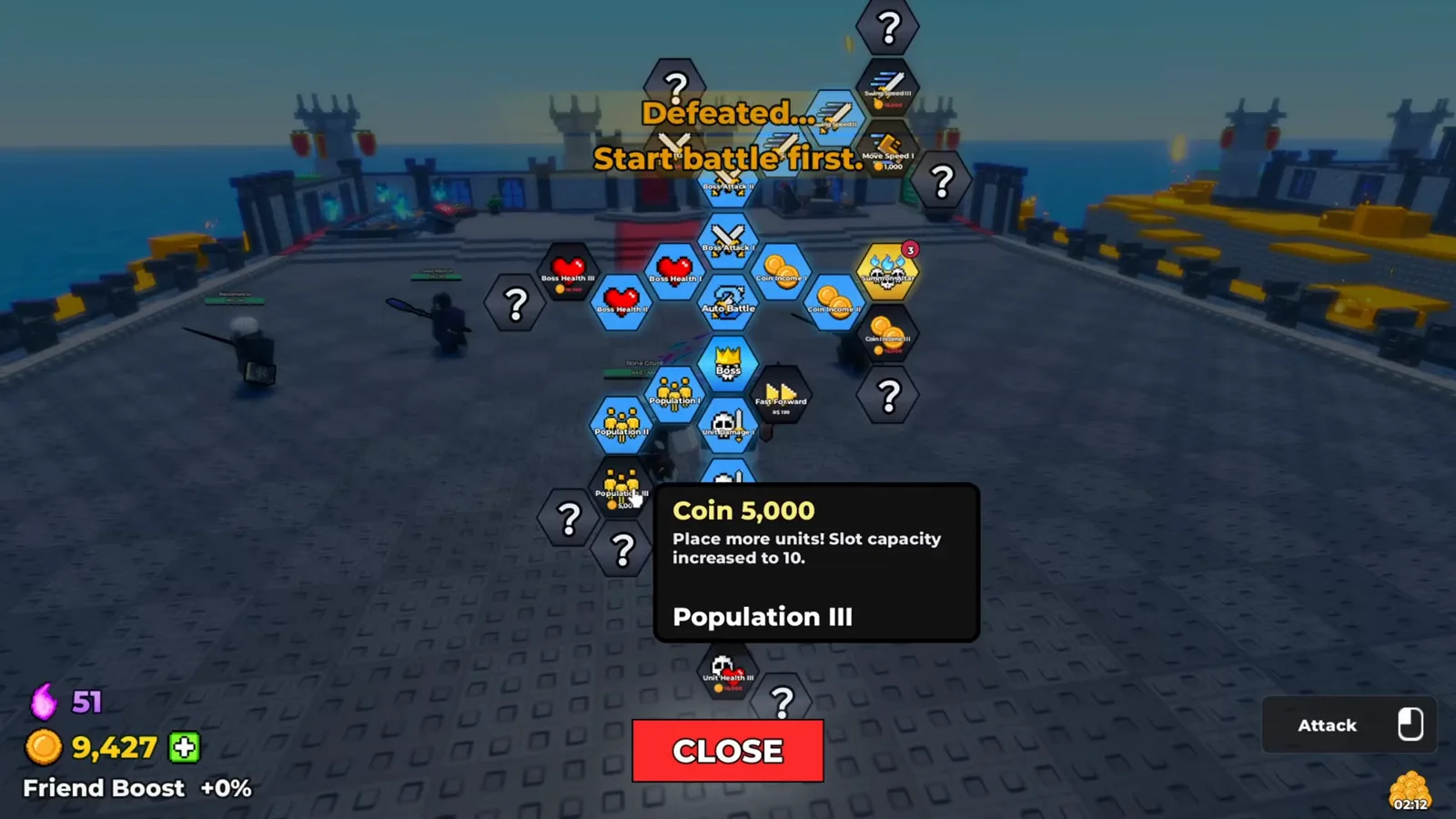
Population III promises the new capacity in words; the tree draws the Population nodes as one ladder. Watch at 3:40 - 5
The shop's Extra Population row adds 10
The paid route up sits in the shop's BOOSTS tab: a row headed Extra Population, described as “+10 unit population!”, and in the donor recording it is already marked Owned. That is all the frame supports - ten more points of population from one boost. Whether it stacks with the skill tree, whether a second copy is ever available, and what it costs on any given account are not shown, so none of that is asserted here; purchase decisions sit outside this page.
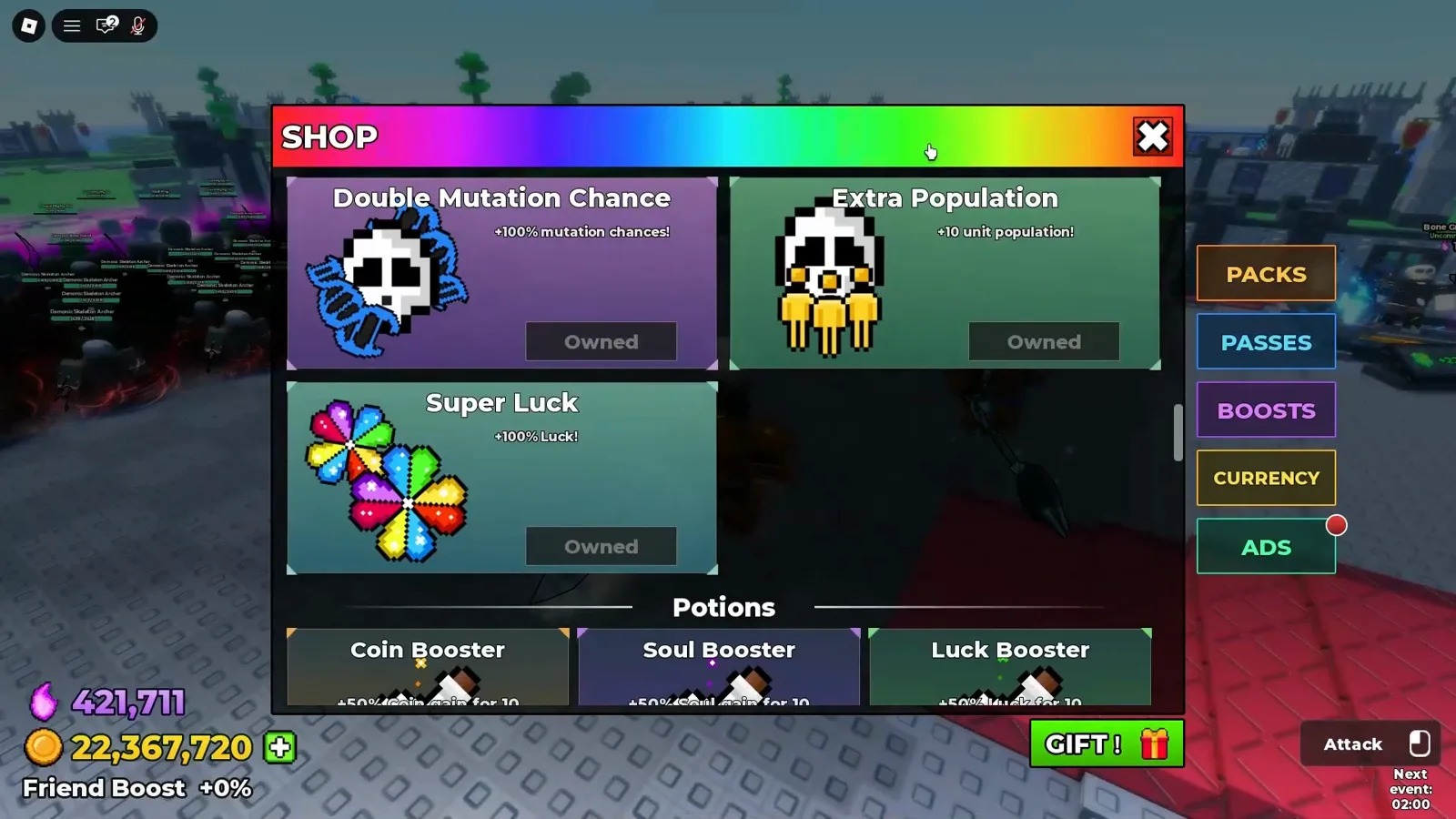
The paid route appears as one BOOSTS row: Extra Population, already Owned in that recording. Watch at 7:30